> For the complete documentation index, see [llms.txt](https://docs.colt.net/llms.txt). Markdown versions of documentation pages are available by appending `.md` to page URLs; this page is available as [Markdown](https://docs.colt.net/on-demand/user-guides/ethernet-on-demand.md).
# ETHERNET ON DEMAND
### INTRODUCTION
Connections are circuits that are routed between two On Demand ports.
There are three different connection types:
1. Ethernet connection between two On Demand access ports (EPL, EVPL or VLAN based mesh)
2. Cloud connection between an On Demand access port and a cloud port, or between two cloud ports
3. Internet connection that terminates on an On Demand access port
This section covers **Ethernet** connections.
## TOPOLOGIES
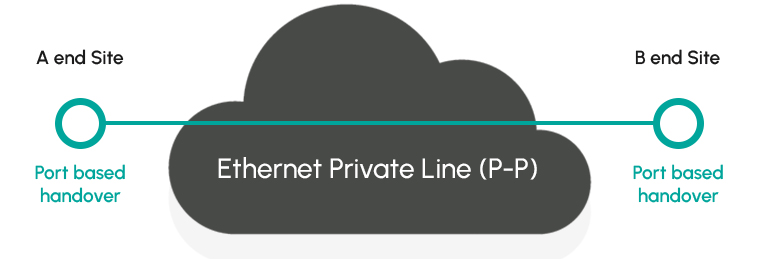
On Demand ports can be dynamically configured to support either Ethernet Private Line (“point to point”) based on transparent handover or Ethernet Virtual Private Line (“hub and spoke”) services based on a VLAN handover.
EPL and EVPL are not treated as different service types in the On Demand platform, although EPL/EVPL services have different VLAN configurations on the origin and destination ports.
### ETHERNET PRIVATE LINE
The Ethernet Private Line (“point to point”) topology is illustrated below.
 ### ETHERNET VIRTUAL PRIVATE LINE
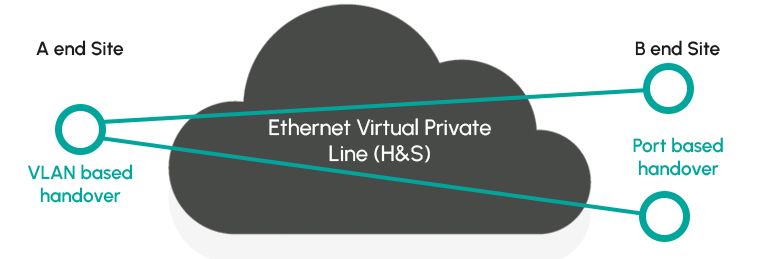
Ethernet Virtual Private Line (“Hub and Spoke”), based on a VLAN handover at the A end and port based handover at the B end is shown below:
### ETHERNET VIRTUAL PRIVATE LINE
Ethernet Virtual Private Line (“Hub and Spoke”), based on a VLAN handover at the A end and port based handover at the B end is shown below:
 ### EVPL (MESH)
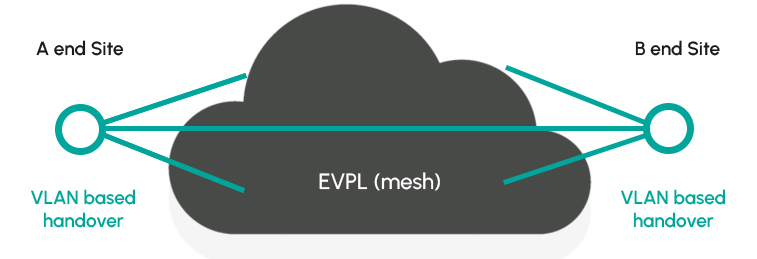
On Demand enables a variation of Ethernet Virtual Private Line, based on a VLAN handover at both the A end B ends – supporting a mesh topology.
### EVPL (MESH)
On Demand enables a variation of Ethernet Virtual Private Line, based on a VLAN handover at both the A end B ends – supporting a mesh topology.
 ### BANDWIDTH
### ETHERNET CONNECTION BANDWIDTHS
On Demand connections support bandwidths between 10Mbps and 40Gbps. Higher bandwidths are available on request.
The below table shows the bandwidths that are supported.
| Component | Bandwidths | Description |
| ---------- | ---------------------------------------------------------------------------------------------------------------------------------------------------------------------------------------------- | ---------------------------------------------------------------------------------------------------------------------------------------------------------------------------------------------------------------------------------------------------------------------------------------------------------------------------------------------------------------------------------------------- |
| Port |
### BANDWIDTH
### ETHERNET CONNECTION BANDWIDTHS
On Demand connections support bandwidths between 10Mbps and 40Gbps. Higher bandwidths are available on request.
The below table shows the bandwidths that are supported.
| Component | Bandwidths | Description |
| ---------- | ---------------------------------------------------------------------------------------------------------------------------------------------------------------------------------------------- | ---------------------------------------------------------------------------------------------------------------------------------------------------------------------------------------------------------------------------------------------------------------------------------------------------------------------------------------------------------------------------------------------- |
| Port | Port speeds (on-net or hybrid on-net / FTTx)
- 1Gbps
- 10Gbps
- 100Gbps (at key DCs only)
Port speeds (off-net)
- 10Mbps-10Gbps
| On-net / hybrid on-net ports
Full rate port speeds (circuit connections up to the physical port speed)
Overbooking is available on request for On Demand ports used as an NNI.
Transparent (open port) or VLAN mode
Offnet ports
Full rate port speed.
Overbooking not supported.
Transparent mode only (no VLAN support)
|
| Connection | All locations:
10, 20, 50, 100, 200, 300, 400, 500Mbps, 1, 2, 3, 4, 5, 10Gbps
Key data centres only:
20, 30, 40Gbps
| Logical Ethernet circuit connection between 2 On Demand ports |
The minimum bandwidth of an Ethernet circuit connection on any port is 10Mbps. For 1Gbps/10Gbps ports, the maximum connection speed is the port speed. For 100Gbps ports the maximum port speed is 40Gbps (KDC-KDC only).
## ETHERNET CONNECTION PRICING & VLAN CONFIGURATION
### CONNECTION CHARGES
Under the On Demand flex pricing model, circuit connections are based on 1 hour and 3/6/12/24/36 month commitments. Customers are charged a per hour rental based on the bandwidth and commitment.
Under the traditional/fixed pricing model, circuit connections are based on fixed 12/24/36 month contracts.
To check the price of an Ethernet Connection, follow these steps:
{% stepper %}
{% step %}
### SELECT NEW CONNECTION
Select the " **New Connection**" on the Home page or " **+Ethernet**" button on the connection page.
{% endstep %}
{% step %}
### CHOOSE ORIGIN AND DESTINATION
Select an **Origin** and a **Destination port** (which can be new or existing) and a **bandwidth** and **commitment** term for each port.
{% endstep %}
{% step %}
### CONFIGURE CONNECTION COMMITMENT
Select a **bandwidth** and **commitment** term for the connection.
{% endstep %}
{% step %}
### VIEW PRICE
The price will be displayed in the bottom right of the screen.
{% endstep %}
{% endstepper %}
For further details, please refer to the [pricing section](https://www.colt.net/solutions/on-demand/resources/pricing/).

### VLAN CONFIGURATION
Connections have three VLAN modes, which apply to each end of the circuit connection:
| Mode | Application | Description |
| ----------- | -------------------------------------------------------------- | ---------------------------------------------------------------------------------------------------------------------------------------------------- |
| Open port | 1 circuit connection per port | Port based handover, all VLANs are passed transparently |
| Add VLAN | Multiple circuit connections per port (Colt adds VLAN tag) | VLAN based handover, 1 VLAN per Connection. VLAN added on egress, towards customer (in translation mode). VLAN can be S-VLAN (88a8) or C-VLAN (8100) |
| Filter VLAN | Multiple circuit connections per port (Colt filters VLAN tags) | VLAN filtered on ingress to Colt network (against a single VLAN number). |
The supported combinations are shown in the table below (A end and B ends can be used interchangeably).
Notes:
* The cloud end is automatically configured as “add VLAN”
* Only 8100 CVLANs supported at AWS end
* Supports different VLAN at each end. VLAN PCP will not be preserved
* For further details on cloud VLAN configurations, please refer to the cloud connectivity section
| A End | B End | Description | Equivalent “Traditional” Colt service | Data Centre & Enterprise Office Connections | Microsoft Azure | Hosted AWS/ Oracle/ Google / IBM | AWS Dedicated |
| ----------- | ----------- | ---------------------------------------------------------------------------- | ------------------------------------- | ------------------------------------------- | --------------- | -------------------------------- | ------------- |
| Open port | Open port | Standard Ethernet Private Line (EPL) configuration | Ethernet Line (EPL) | Supported | N/A | N/A | Supported |
| Add VLAN | Open port | Ethernet Virtual Private Line (EVPL) configuration | Ethernet Hub & Spoke | Supported | Supported | Supported | Supported |
| Add VLAN | Add VLAN | Ethernet Virtual Private Line (EVPL), hub presentation at both ends (note 3) | N/A | Supported | Supported | Supported | Supported |
| Filter VLAN | Filter VLAN | As per scenario 3 above, except VLAN IDs are preserved (same at each end) | Ethernet Line (EVPL) | Supported | N/A | N/A | Supported |
Contact / support details
Speak with one of our specialists today. We’re here to offer advice, provide further information and to answer any queries you may have.
[Check your connectivity](https://www.colt.net/connect/)