
QUOTING
CREATE A QUOTE
Before an order can be placed, a valid quote must first be generated.
It is important to understand that multiple quote in instances can be created via the new quote flow. For example, a request for 5 different bandwidths and 3 different contract terms will result in 15 quote instances, which can then be downloaded individually.
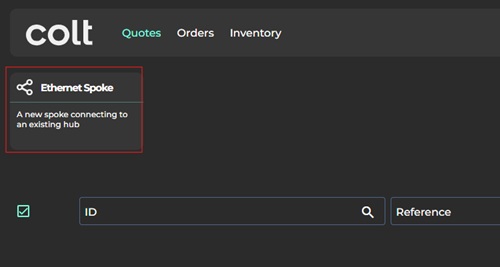
Under the “Quotes” menu, the “Ethernet Spoke” option should be selected.

The next step is to choose a location for the B end (i.e. the end customer location, not the A end hub).
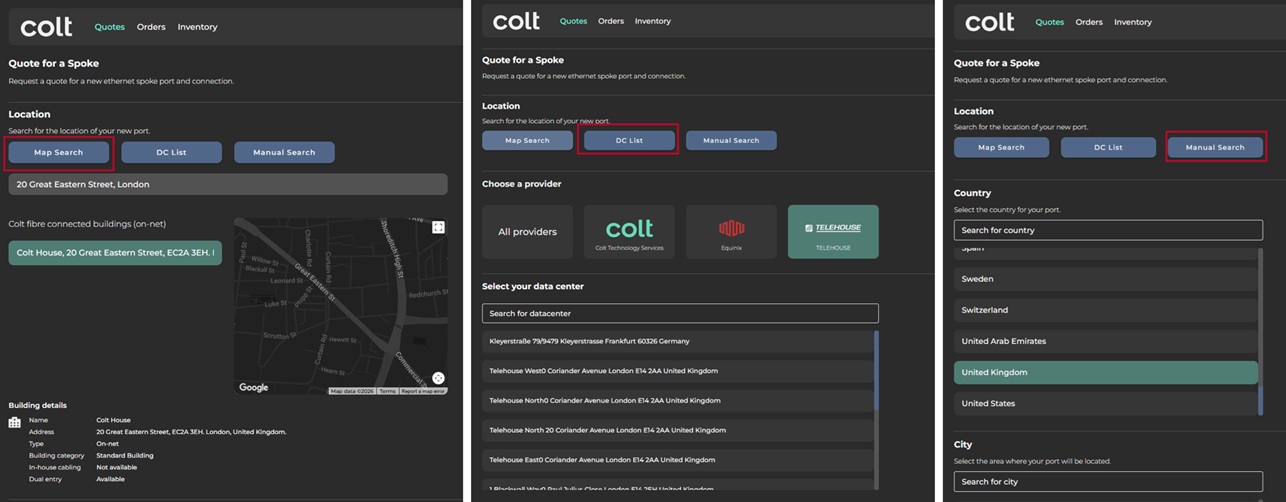
There are three ways to search for a customer location:
Map search (default) – addresses can be entered using the default Google Maps based interface
Data Centre List – where the B end location is a recognised data centre, this useful shortcut simplifies the address selection journey
Manual search – this option is useful where Google maps doesn’t recognise the address.

Locations that are on-net for Colt (i.e. connected to the Colt fibre network) or hybrid on-net (connected via an FTTx fibre partner) will appear immediately.
Where no on-net or hybrid on-net location is available, select the “Search for nearnet and offnet locations” option.
Once the address has been selected, select one or more connection bandwidths (10Mbps-40Gbps) and a contract term (12-60 months).
Next, select a delivery period (business hours vs out of hours) and a hub location (metro city). Note that only hubs that have been onboarded against the On Demand account instance will be shown (to onboard a new Ethernet hub, customers should speak to the Colt account team).
Finally, assign an individual reference, which will appear on all quote instances generated from the request.
Once the request quote option is selected, the quote will be generated, and after a few minutes will be visible on the main quotes page.

The quote will then be assigned a quote status as per the below table (the equivalent Mplify status is shown for clarity).
PENDING READY
Quote is being prepared
In progress
Amber
READY
Quote is available, ready for order
Approved,
Orderable
Green
ORDERED
Quote has been converted to an order
Accepted
White
CANCELLED
Quote has been cancelled by the Colt admin
Not used today
Red
EXPIRED
The Colt has exceeded its 90 day validity period
Expired
Red
UNAVAILABLE
Quote generation has failed
Unable to provide
Red
Quotes are valid for 90 days after creation.
Last updated
Was this helpful?