> For the complete documentation index, see [llms.txt](https://docs.colt.net/llms.txt). Markdown versions of documentation pages are available by appending `.md` to page URLs; this page is available as [Markdown](https://docs.colt.net/on-demand/ja/user-guides/cloud-on-demand/ovhcloud.md).
# OVHcloud オンデマンド
OVHcloud Connect
OVHcloud Connect は、専用のプライベート接続を介して OVHcloud へのプライベートで信頼性の高いネットワーク接続を提供し、顧客はパブリックインターネットを経由せずに利用できます。
Colt はサポートしています **OVHcloud Connect Direct(専用ポート)** On Demand プラットフォーム上で。\
\
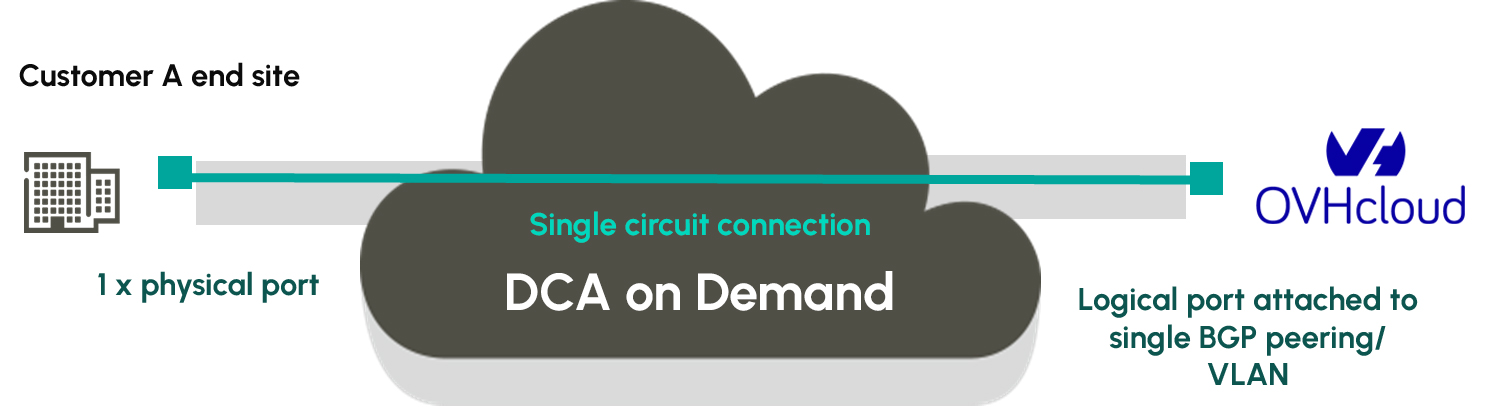
専用ポートを利用すると、顧客は同じ OVHcloud ポート上で複数の BGP ピアリングを確立できます。On Demand 回線接続はほぼリアルタイムで確立できますが、OVHcloud Connect Direct と Colt ネットワークの間には物理的なクロスコネクトが必要です。
| 機能 | 専用ポート |
| ---------------------------------------------- | -------------------- |
| OVHcloud Connect Direct の引き渡し | 新しいポートとファイバーのクロスコネクト |
| 提供体験 | 物理ファイバー敷設に複数日 |
| OVHcloud Connect Direct の帯域幅 | 1Gbps または 10Gbps |
| BGP ピアリング / VLAN | 複数の BGP ピアリング / VLAN |
| On Demand 回線での帯域変更(フレックス、BW Boost、恒久的なアップグレード) | はい – 専用ポート速度まで |
### OVHCLOUD CONNECT DIRECT ポート
OVHcloud Connect Direct ポートは、OVHcloud との複数の BGP ピアリングをサポートします。
専用ポートは、顧客が同一の物理 Direct Connect ロケーションで OVHcloud との複数のピアリングを確立する必要がある場合に最適な OVHcloud Connect Direct ソリューションです。
#### OVHCLOUD CONNECT DIRECT ポート(クラウドポートページ経由)
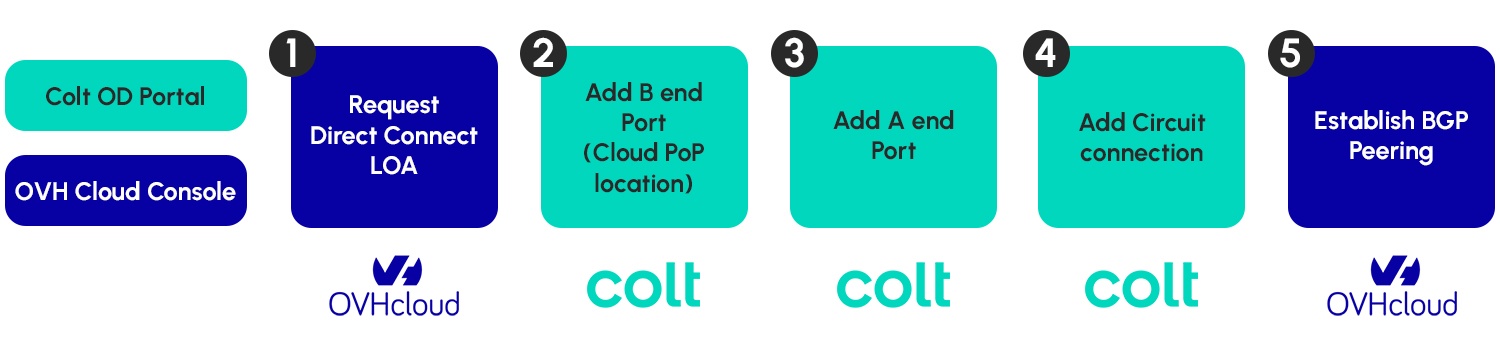
顧客はまず OVHcloud のサブスクリプションから専用ポートを申請し、正しい OVHcloud Connect リージョンと OVHcloud Connect Direct Dedicated PoP を選択する必要があります。続いて OVHcloud コンソール内で Letter of Authority(LOA)が生成され、提供されているボタンを使用して On Demand ポータルにアップロードする必要があります。
*\*重要 – 顧客が正しい* OVHcloud Connect Direct Dedicated *リージョンと* OVHcloud Connect Direct Dedicated *OVHcloud コンソール内の PoP ロケーションを選択することが重要です。\**
各 OVHcloud Connect Direct Dedicated PoP は主要リージョンに紐付いていますが、顧客は複数のリージョンにアクセスできます。
On Demand プラットフォームでは、1Gbps と 10Gbps の専用ポートがサポートされています。
リクエストが提出されると、Colt の導入チームが LOA に記載された情報を使用して、Colt On Demand ポートと OVHcloud ルーター間のクロスコネクトを手配します。クロスコネクトの通常のリードタイムは 5 営業日です。
#### OVHCLOUD CONNECT DIRECT DEDICATED ポートへの接続
OVHcloud Connect Direct Dedicated ポートは標準ポートモデルに基づいており、1 つまたは複数の回線接続を 1 つの OVHcloud Connect Direct Dedicated ポートにルーティングできます。
標準ポートの VLAN モードは、顧客側 A エンドサイトで適用されます。
専用ポートモデルでは、OVHcloud は VLAN に帯域幅を課しません。VLAN は動的にスケーリングされます。
以下の VLAN モードは OVHcloud の B エンド(つまり専用ポート側)に適用され、下の表に要約されています:
| モード | 用途 | 説明 |
| ------- | ------------------------------------------------------- | ---------------------------------------------------------------------------------------------------------------------------------------------------------------------------------- |
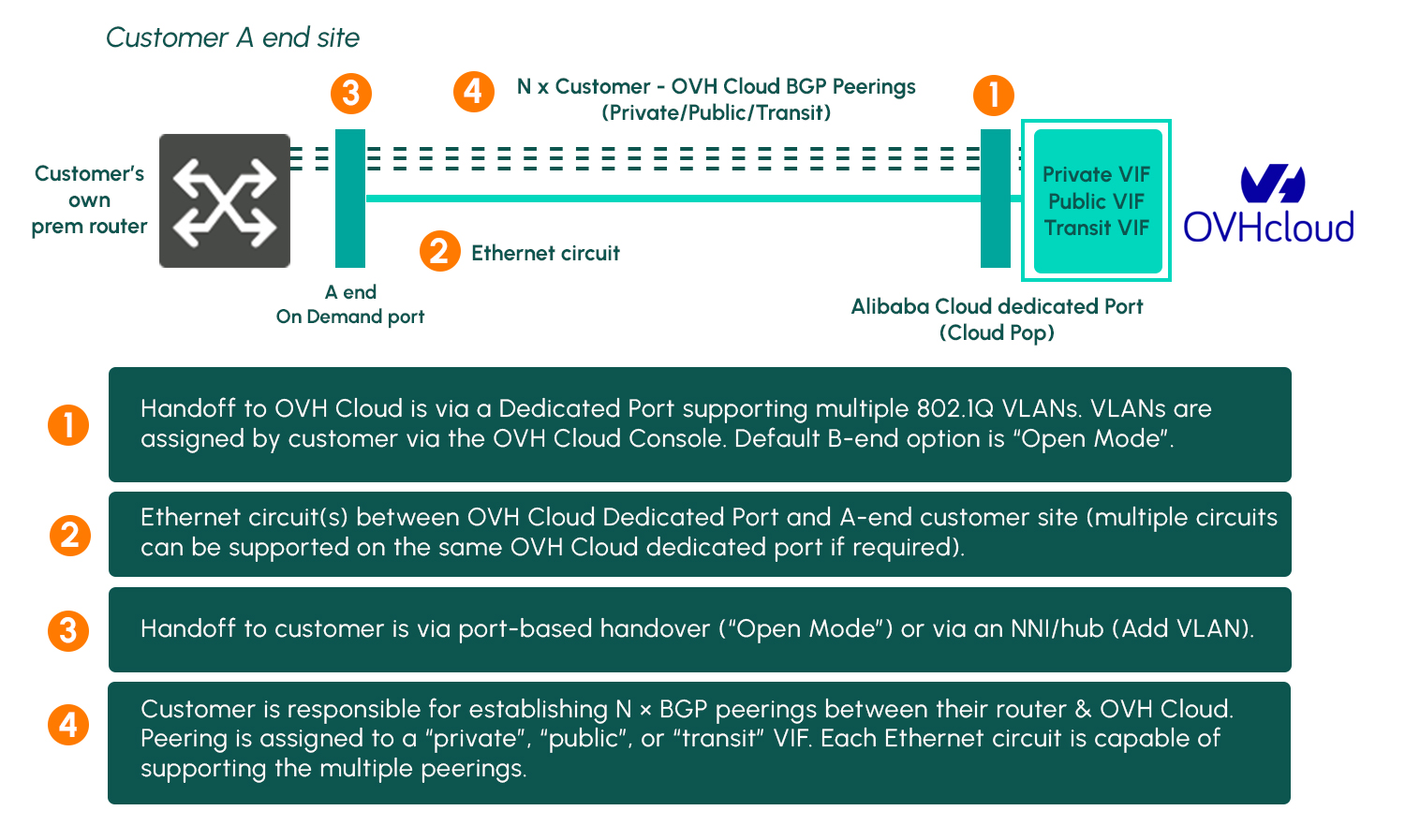
| オープンポート | 1 つの回線接続にマッピングされた OVHcloud Connect Direct Dedicated ポート | ポートベースの引き渡し。すべての OVHcloud Connect Direct Dedicated VLAN は Colt ネットワークを通じて B エンド ポートへ透過的に転送されます。VLAN の割り当ては OVHcloud コンソール経由で顧客が行う責任があります(A エンドサイトでの Filter VLAN オプションはサポートされていません) |
#### OVHCLOUD CONNECT DIRECT DEDICATED ポート構成
以下の図は構成の概要を示しています:
#### OVHCLOUD CONNECT DIRECT DEDICATED ポートの顧客フロー
OVHcloud Connect Direct Dedicated ポートへのエンドツーエンドの接続を確立するための顧客フローを以下に示します。なお、LOA は、該当リージョンに関連付けられた正しい OVHcloud Connect Direct Dedicated リージョンおよび OVHcloud Connect Direct Dedicated PoP に対して申請する必要があります。
---
# Agent Instructions
This documentation is published with GitBook. GitBook is the documentation platform designed so that both humans and AI agents can read, navigate, and reason over technical content effectively. Learn more at gitbook.com.
## Querying This Documentation
If you need additional information that is not directly available in this page, you can query the documentation by asking a question.
Perform an HTTP GET request on the following URL with the `ask` and `goal` query parameters:
```
GET https://docs.colt.net/on-demand/ja/user-guides/cloud-on-demand/ovhcloud.md?ask=&goal=
```
`ask` is the immediate question: it should be specific, self-contained, and written in natural language.
`goal` is what the user is ultimately trying to achieve, the reason they need the answer. Sharing it helps GitBook give you a better, more relevant answer. A goal is most helpful when it describes the outcome the user wants rather than restating the question. For example, with `ask=how do I create an API token`, a goal like `automate deployments from our CI pipeline` lets GitBook tailor the answer to that use case.
The response will contain a direct answer to the question and relevant excerpts and sources from the documentation.
Use this mechanism when the answer is not explicitly present in the current page, you need clarification or additional context, or you want to retrieve related documentation sections.