> For the complete documentation index, see [llms.txt](https://docs.colt.net/llms.txt). Markdown versions of documentation pages are available by appending `.md` to page URLs; this page is available as [Markdown](https://docs.colt.net/on-demand/ja/user-guides/cloud-on-demand/oracle.md).
# Oracle オンデマンド
クラウド接続ガイド: オンデマンド
### ORACLE FASTCONNECT
#### ORACLE FASTCONNECT ホステッドポート
新しい Oracle FastConnect 接続を作成するには、まず Oracle Cloud ポータルで FastConnect サービスを作成する必要があります。
以下の情報を入力する必要があります:
{% stepper %}
{% step %}
### プロバイダーを選択
「Oracle Provider」を選択し、次に「Colt DCA」を選択します。
{% endstep %}
{% step %}
### ドメインを選択
「Private/Public」ドメインを選択します。
{% endstep %}
{% step %}
### 帯域幅を入力
FastConnect ポートの帯域幅(1G〜10G)を入力します。
{% endstep %}
{% step %}
### ルーティングを入力
BGP ルーティングの詳細を入力します。
{% endstep %}
{% endstepper %}
FastConnect サービスが作成されると、サービスキーが割り当てられます。これは Colt On Demand ポータルでクラウドポートを作成する際に必要になります。
FastConnect ホステッドサービスは、Colt と Oracle の間の共有 NNI 上で引き渡されます。
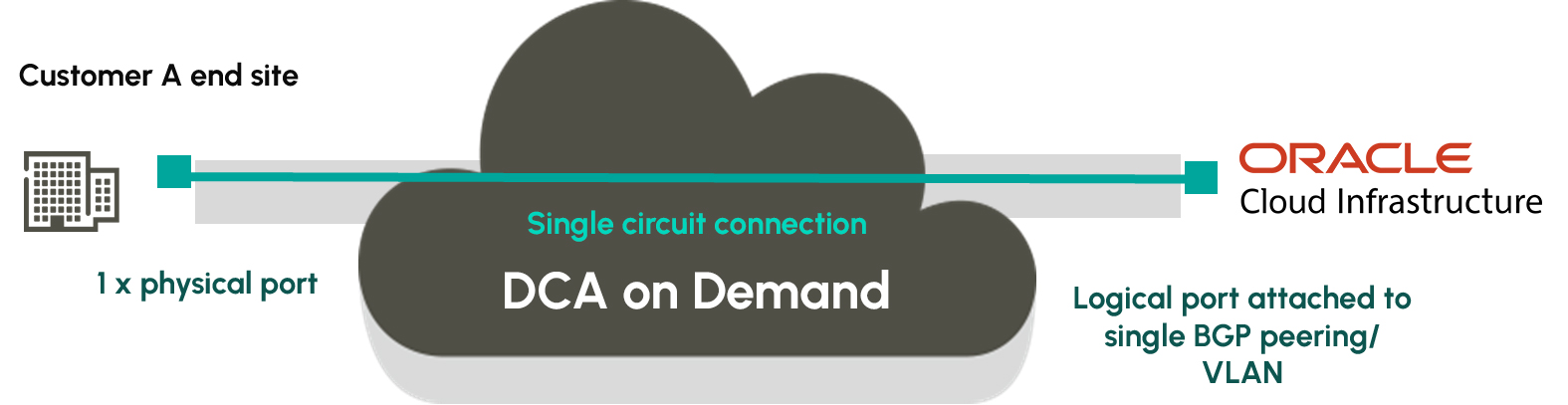 #### ORACLE FASTCONNECT ホステッドポートへの接続
Oracle FastConnect ポートへの接続は、ホステッドポートへの 1:1 回線接続マッピングに基づいています。クラウド側 B エンドの構成は常に単一の 802.1Q VLAN\* に基づいており、これはデフォルトの「Cloud VLAN」オプションを選択すると自動的に設定されます。\* Ethertype は 8100 ですが、これはお客様には表示されません
標準の VLAN モードはカスタマー側 A エンドポートに適用され、以下の表に要約されています:
| カスタマーポートモード | 用途 | 説明 |
| ----------- | ------------------------------------- | ----------------------------------------------------------------------------------------------------------------------------------------------------- |
| オープンポート | 回線が A エンドポート全体を占有 | ポートベースの引き渡し。カスタマーポート上のすべてのトラフィックはクラウドポートにマッピングされます |
| VLAN を追加 | お客様は単一のタグ付き VLAN を使用してトラフィックをマッピングします | 出口側で、顧客側に向けて VLAN を追加します(変換モード)。VLAN は S-VLAN(88a8)または C-VLAN(8100)にできます。標準の H\&S 構成です。VLAN には 3 つの「内側」VLAN が含まれます。お客様は内側 VLAN を「外側」タグにマッピングする必要があります |
#### ORACLE FASTCONNECT 構成
以下の図は構成の概要を示しています:

#### エンドツーエンドのカスタマージャーニー
Oracle FastConnect ポートへのエンドツーエンド接続を確立するためのカスタマージャーニーを以下に示します。

#### FASTCONNECT 専用ポート
1Gbps および 10Gbps の FastConnect 専用ポートへの接続は、標準の DCNet On Demand ポートを介してサポートできます。これは、On Demand ポータルから DC クロスコネクトが要求されている場合に提供されます(Oracle の LOA はクロスコネクト要求に添付する必要があります)。
#### ORACLE と COLT ON DEMAND の統合
Oracle は Colt の On Demand 注文機能を OCI プラットフォームに統合しました。OCI ポータルを離れることなく、Oracle Cloud サービスへシームレスに接続できるようになりました。
{% embed url="" %}
{% hint style="info" %}
On Demand についてもっと知りたいですか? Colt On Demand は、データセンターと企業オフィス間のポイントツーポイント接続、パブリッククラウドへのプライベート接続、インターネット接続をサポートします。On Demand ソリューションページにアクセスして、On Demand の詳細と、それがビジネスに最適な経路を見つけるのにどう役立つかをご確認ください。
[On Demand を見る](https://www.colt.net/solutions/on-demand/)
{% endhint %}
---
# Agent Instructions
This documentation is published with GitBook. GitBook is the documentation platform designed so that both humans and AI agents can read, navigate, and reason over technical content effectively. Learn more at gitbook.com.
## Querying This Documentation
If you need additional information that is not directly available in this page, you can query the documentation by asking a question.
Perform an HTTP GET request on the following URL with the `ask` and `goal` query parameters:
```
GET https://docs.colt.net/on-demand/ja/user-guides/cloud-on-demand/oracle.md?ask=&goal=
```
`ask` is the immediate question: it should be specific, self-contained, and written in natural language.
`goal` is what the user is ultimately trying to achieve, the reason they need the answer. Sharing it helps GitBook give you a better, more relevant answer. A goal is most helpful when it describes the outcome the user wants rather than restating the question. For example, with `ask=how do I create an API token`, a goal like `automate deployments from our CI pipeline` lets GitBook tailor the answer to that use case.
The response will contain a direct answer to the question and relevant excerpts and sources from the documentation.
Use this mechanism when the answer is not explicitly present in the current page, you need clarification or additional context, or you want to retrieve related documentation sections.
#### ORACLE FASTCONNECT ホステッドポートへの接続
Oracle FastConnect ポートへの接続は、ホステッドポートへの 1:1 回線接続マッピングに基づいています。クラウド側 B エンドの構成は常に単一の 802.1Q VLAN\* に基づいており、これはデフォルトの「Cloud VLAN」オプションを選択すると自動的に設定されます。\* Ethertype は 8100 ですが、これはお客様には表示されません
標準の VLAN モードはカスタマー側 A エンドポートに適用され、以下の表に要約されています:
| カスタマーポートモード | 用途 | 説明 |
| ----------- | ------------------------------------- | ----------------------------------------------------------------------------------------------------------------------------------------------------- |
| オープンポート | 回線が A エンドポート全体を占有 | ポートベースの引き渡し。カスタマーポート上のすべてのトラフィックはクラウドポートにマッピングされます |
| VLAN を追加 | お客様は単一のタグ付き VLAN を使用してトラフィックをマッピングします | 出口側で、顧客側に向けて VLAN を追加します(変換モード)。VLAN は S-VLAN(88a8)または C-VLAN(8100)にできます。標準の H\&S 構成です。VLAN には 3 つの「内側」VLAN が含まれます。お客様は内側 VLAN を「外側」タグにマッピングする必要があります |
#### ORACLE FASTCONNECT 構成
以下の図は構成の概要を示しています:

#### エンドツーエンドのカスタマージャーニー
Oracle FastConnect ポートへのエンドツーエンド接続を確立するためのカスタマージャーニーを以下に示します。

#### FASTCONNECT 専用ポート
1Gbps および 10Gbps の FastConnect 専用ポートへの接続は、標準の DCNet On Demand ポートを介してサポートできます。これは、On Demand ポータルから DC クロスコネクトが要求されている場合に提供されます(Oracle の LOA はクロスコネクト要求に添付する必要があります)。
#### ORACLE と COLT ON DEMAND の統合
Oracle は Colt の On Demand 注文機能を OCI プラットフォームに統合しました。OCI ポータルを離れることなく、Oracle Cloud サービスへシームレスに接続できるようになりました。
{% embed url="" %}
{% hint style="info" %}
On Demand についてもっと知りたいですか? Colt On Demand は、データセンターと企業オフィス間のポイントツーポイント接続、パブリッククラウドへのプライベート接続、インターネット接続をサポートします。On Demand ソリューションページにアクセスして、On Demand の詳細と、それがビジネスに最適な経路を見つけるのにどう役立つかをご確認ください。
[On Demand を見る](https://www.colt.net/solutions/on-demand/)
{% endhint %}
---
# Agent Instructions
This documentation is published with GitBook. GitBook is the documentation platform designed so that both humans and AI agents can read, navigate, and reason over technical content effectively. Learn more at gitbook.com.
## Querying This Documentation
If you need additional information that is not directly available in this page, you can query the documentation by asking a question.
Perform an HTTP GET request on the following URL with the `ask` and `goal` query parameters:
```
GET https://docs.colt.net/on-demand/ja/user-guides/cloud-on-demand/oracle.md?ask=&goal=
```
`ask` is the immediate question: it should be specific, self-contained, and written in natural language.
`goal` is what the user is ultimately trying to achieve, the reason they need the answer. Sharing it helps GitBook give you a better, more relevant answer. A goal is most helpful when it describes the outcome the user wants rather than restating the question. For example, with `ask=how do I create an API token`, a goal like `automate deployments from our CI pipeline` lets GitBook tailor the answer to that use case.
The response will contain a direct answer to the question and relevant excerpts and sources from the documentation.
Use this mechanism when the answer is not explicitly present in the current page, you need clarification or additional context, or you want to retrieve related documentation sections.