> For the complete documentation index, see [llms.txt](https://docs.colt.net/llms.txt). Markdown versions of documentation pages are available by appending `.md` to page URLs; this page is available as [Markdown](https://docs.colt.net/on-demand/ja/user-guides/cloud-on-demand.md).
# クラウド オンデマンド
## CLOUD ON DEMAND の概要
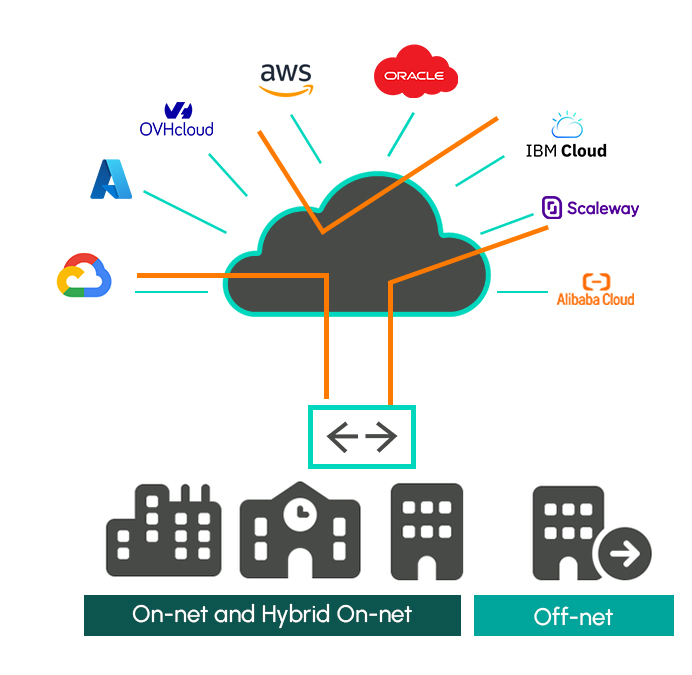
Cloud On Demandサービスでは、データセンターや企業拠点からパブリッククラウドへの接続が提供されます。
Colt On Demandを通じて、ColtはAWS、Microsoft Azure、Google、Oracle、IBM、Alibaba、OVHの各クラウドプラットフォームへの接続を実現しています。
お客様は、1,100超のオンネットデータセンター、32,000超のオンネット企業ビル、130,000超のハイブリッドオンネットビル、および数百万のオフネットビルから、統合キャリアパートナーを介してクラウドへ接続できます。
お客様は、共有インターコネクト上でのリアルタイムAPI自動化に基づく「ホステッド」接続モデルと、お客様専用にクラウドポートとクロスコネクトが割り当てられる「専用」モデルを選択できます。
 ***
## クラウドポート
Cloud On Demandのサービスモデルでは、クラウド固有のサービス要素が2つあります。—クラウドポートとクラウドポートへの接続です。クラウドポートはホステッドまたは専有にできます。クラウド接続は、標準のOn Demandアクセスポートとクラウドポートの間、または「クラウド間」トポロジーにおける任意の2つのクラウドポート間で提供できます。
クラウド回線接続の帯域幅を柔軟に変更したいお客様には、その上限まで帯域幅を拡張できるよう、クラウドポートを大きめに確保することをお勧めします。
クラウドポートがプロビジョニングされると、お客様はAエンドポートとクラウドポート間の新しいクラウド接続を依頼できます。以下の表は、ホステッドモデルと専有モデルの両方におけるクラウドポートの帯域幅オプションを要約しています。
Coltはホステッドクラウドポートに料金を請求しません。専有クラウドポートには、初期設置料金と月額レンタル料金が発生し、これにはColtのクラウドポートとクラウドプロバイダーのポート間のデータセンター内クロスコネクトが含まれます。

クラウドポートは、単独のコンポーネントとして、またはエンドツーエンド接続の注文フローの一部として注文できます。ホステッドポートは仮想であり、Service Key(または同等のもの)が必要で、ほぼリアルタイムで有効化されます。専有ポートはデータセンターでの物理的な構築が必要であり、サービスを有効にするにはクラウドサービスプロバイダーからのLOAが必要です。

ホステッドのEquinixポートもクラウドポートの注文フローを通じて有効化されることにご注意ください。詳細は「On Demand Interconnect」セクションをご参照ください。
***
## クラウド接続
クラウド接続は、On Demandアクセスポートと専有/ホステッドクラウドポートの間、またはクラウド-クラウド接続モデルにおける専有/ホステッド接続間で提供できます。冗長性のためには追加の回線と追加のクラウドポートが必要ですが、Microsoft Azure ExpressRouteは例外で、1つのクラウドポートで2つの個別のクラウド接続をサポートできます。

注 - MicrosoftのExpressRoute SLAのメリットを得たいお客様には、2回線が必須です。回線が1つのみ提供される場合、MicrosoftのSLAは適用されません。
**ColtのクラウドODサービスはレイヤー2のイーサネット接続をベースとしており、お客様はクラウドプロバイダーとレイヤー3のピアリングを確立する必要があることにご留意ください。**
Cloud On Demandサービスで柔軟な契約を選択予定のお客様は、変更可能な帯域幅の上限を選択してください。
On Demandクラウド接続でサポートされる帯域幅の範囲は、クラウドポートの帯域幅に基づきます。Bエンドの顧客ポートでサポートされる回線帯域幅に制限はありません。
各クラウドパートナーの詳細については、上記のリンクから該当するパートナーをクリックしてください。
***
## ご質問がありますか? いつでもお手伝いします。
{% hint style="info" %}
本日、当社のスペシャリストにご相談ください。ご助言、追加情報のご提供、ご質問への回答を承ります。
[接続を確認する](https://www.colt.net/connect/)
{% endhint %}

---
# Agent Instructions
This documentation is published with GitBook. GitBook is the documentation platform designed so that both humans and AI agents can read, navigate, and reason over technical content effectively. Learn more at gitbook.com.
## Querying This Documentation
If you need additional information that is not directly available in this page, you can query the documentation by asking a question.
Perform an HTTP GET request on the following URL with the `ask` and `goal` query parameters:
```
GET https://docs.colt.net/on-demand/ja/user-guides/cloud-on-demand.md?ask=&goal=
```
`ask` is the immediate question: it should be specific, self-contained, and written in natural language.
`goal` is what the user is ultimately trying to achieve, the reason they need the answer. Sharing it helps GitBook give you a better, more relevant answer. A goal is most helpful when it describes the outcome the user wants rather than restating the question. For example, with `ask=how do I create an API token`, a goal like `automate deployments from our CI pipeline` lets GitBook tailor the answer to that use case.
The response will contain a direct answer to the question and relevant excerpts and sources from the documentation.
Use this mechanism when the answer is not explicitly present in the current page, you need clarification or additional context, or you want to retrieve related documentation sections.
***
## クラウドポート
Cloud On Demandのサービスモデルでは、クラウド固有のサービス要素が2つあります。—クラウドポートとクラウドポートへの接続です。クラウドポートはホステッドまたは専有にできます。クラウド接続は、標準のOn Demandアクセスポートとクラウドポートの間、または「クラウド間」トポロジーにおける任意の2つのクラウドポート間で提供できます。
クラウド回線接続の帯域幅を柔軟に変更したいお客様には、その上限まで帯域幅を拡張できるよう、クラウドポートを大きめに確保することをお勧めします。
クラウドポートがプロビジョニングされると、お客様はAエンドポートとクラウドポート間の新しいクラウド接続を依頼できます。以下の表は、ホステッドモデルと専有モデルの両方におけるクラウドポートの帯域幅オプションを要約しています。
Coltはホステッドクラウドポートに料金を請求しません。専有クラウドポートには、初期設置料金と月額レンタル料金が発生し、これにはColtのクラウドポートとクラウドプロバイダーのポート間のデータセンター内クロスコネクトが含まれます。

クラウドポートは、単独のコンポーネントとして、またはエンドツーエンド接続の注文フローの一部として注文できます。ホステッドポートは仮想であり、Service Key(または同等のもの)が必要で、ほぼリアルタイムで有効化されます。専有ポートはデータセンターでの物理的な構築が必要であり、サービスを有効にするにはクラウドサービスプロバイダーからのLOAが必要です。

ホステッドのEquinixポートもクラウドポートの注文フローを通じて有効化されることにご注意ください。詳細は「On Demand Interconnect」セクションをご参照ください。
***
## クラウド接続
クラウド接続は、On Demandアクセスポートと専有/ホステッドクラウドポートの間、またはクラウド-クラウド接続モデルにおける専有/ホステッド接続間で提供できます。冗長性のためには追加の回線と追加のクラウドポートが必要ですが、Microsoft Azure ExpressRouteは例外で、1つのクラウドポートで2つの個別のクラウド接続をサポートできます。

注 - MicrosoftのExpressRoute SLAのメリットを得たいお客様には、2回線が必須です。回線が1つのみ提供される場合、MicrosoftのSLAは適用されません。
**ColtのクラウドODサービスはレイヤー2のイーサネット接続をベースとしており、お客様はクラウドプロバイダーとレイヤー3のピアリングを確立する必要があることにご留意ください。**
Cloud On Demandサービスで柔軟な契約を選択予定のお客様は、変更可能な帯域幅の上限を選択してください。
On Demandクラウド接続でサポートされる帯域幅の範囲は、クラウドポートの帯域幅に基づきます。Bエンドの顧客ポートでサポートされる回線帯域幅に制限はありません。
各クラウドパートナーの詳細については、上記のリンクから該当するパートナーをクリックしてください。
***
## ご質問がありますか? いつでもお手伝いします。
{% hint style="info" %}
本日、当社のスペシャリストにご相談ください。ご助言、追加情報のご提供、ご質問への回答を承ります。
[接続を確認する](https://www.colt.net/connect/)
{% endhint %}

---
# Agent Instructions
This documentation is published with GitBook. GitBook is the documentation platform designed so that both humans and AI agents can read, navigate, and reason over technical content effectively. Learn more at gitbook.com.
## Querying This Documentation
If you need additional information that is not directly available in this page, you can query the documentation by asking a question.
Perform an HTTP GET request on the following URL with the `ask` and `goal` query parameters:
```
GET https://docs.colt.net/on-demand/ja/user-guides/cloud-on-demand.md?ask=&goal=
```
`ask` is the immediate question: it should be specific, self-contained, and written in natural language.
`goal` is what the user is ultimately trying to achieve, the reason they need the answer. Sharing it helps GitBook give you a better, more relevant answer. A goal is most helpful when it describes the outcome the user wants rather than restating the question. For example, with `ask=how do I create an API token`, a goal like `automate deployments from our CI pipeline` lets GitBook tailor the answer to that use case.
The response will contain a direct answer to the question and relevant excerpts and sources from the documentation.
Use this mechanism when the answer is not explicitly present in the current page, you need clarification or additional context, or you want to retrieve related documentation sections.