> For the complete documentation index, see [llms.txt](https://docs.colt.net/llms.txt). Markdown versions of documentation pages are available by appending `.md` to page URLs; this page is available as [Markdown](https://docs.colt.net/on-demand/ja/on-demand-lso-portal/mori.md).
# 見積もり
## 見積を作成
注文を行う前に、有効な見積をまず生成する必要があります。
新しい見積フローでは、複数の見積インスタンスを作成できることを理解しておくことが重要です。たとえば、5種類の帯域幅と3種類の契約期間を要求すると、15の見積インスタンスが生成され、それぞれ個別にダウンロードできます。
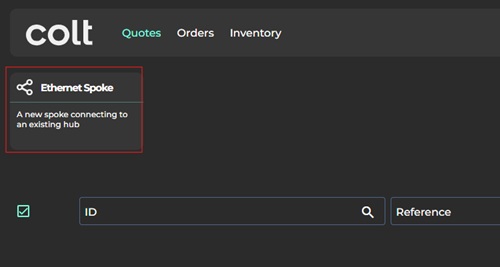
「〜」の下に **「Quotes」** メニューでは、 **「Ethernet Spoke」** オプションを選択してください。
次のステップは、Bエンドのロケーション(つまりAエンドのハブではなく、エンドカスタマーの所在地)を選択することです。
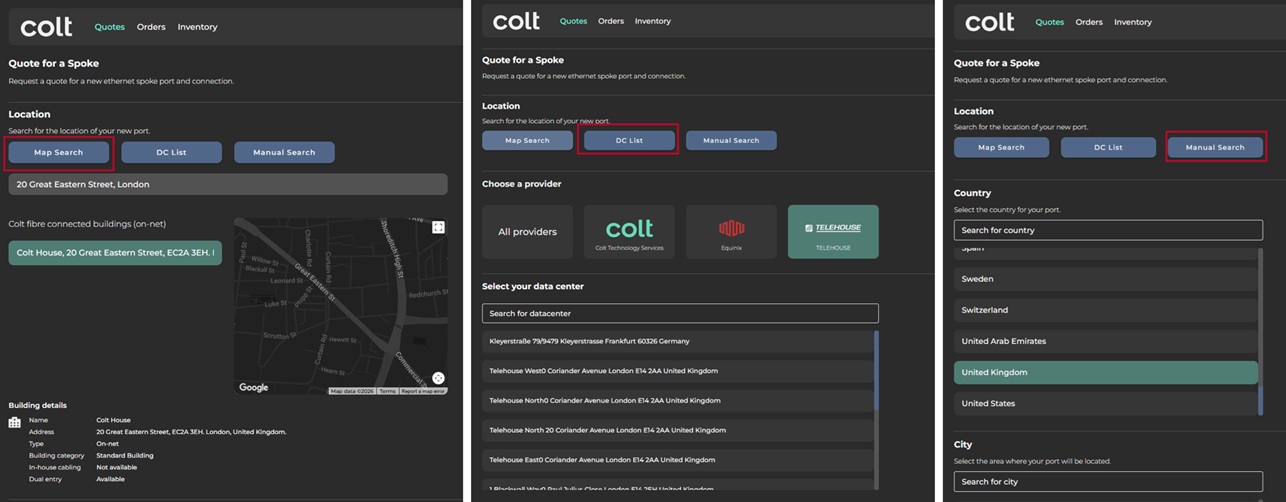
顧客ロケーションを検索する方法は3つあります。
1. **マップ検索(デフォルト)** – 住所はデフォルトのGoogleマップベースのインターフェースで入力できます
2. **データセンター一覧** – Bエンドのロケーションが認識済みのデータセンターである場合、この便利なショートカットにより住所選択の手順が簡単になります
3. **手動検索** – Googleマップで住所が認識されない場合に便利なオプションです。
Coltのオンネット(つまりColtのファイバーネットワークに接続済み)またはハイブリッドオンネット(FTTxファイバーパートナー経由で接続済み)のロケーションは、すぐに表示されます。
オンネットまたはハイブリッドオンネットのロケーションが利用できない場合は、 **「nearnetおよびoffnetのロケーションを検索」** オプション。
住所を選択したら、1つ以上の接続帯域幅(10Mbps~40Gbps)と契約期間(12~60か月)を選択します。
次に、 **配信期間** (営業時間内か営業時間外か)と、 **ハブ所在地** (メトロ都市)を選択します。なお、On Demandアカウントインスタンスに対してオンボード済みのハブのみが表示されます(新しいEthernetハブをオンボードするには、Coltのアカウントチームにご相談ください)。
最後に、個別の **参照番号**を割り当てます。これは、要求から生成されるすべての見積インスタンスに表示されます。
「 **見積を要求** 」オプションを選択すると、見積が生成され、数分後にメインの見積ページに表示されます。
その後、見積には下の表のとおり見積ステータスが割り当てられます(分かりやすくするため、対応するMplifyのステータスも表示しています)。
LSO見積ステータス
説明
Mplify(MEF)の見積状態
カラーコード
保留中・準備完了
見積を準備中
進行中
アンバー
準備完了
見積は利用可能で、注文できます
承認済み、
注文可能
緑
注文済み
見積は注文に変換されました
承認済み
白
キャンセル済み
見積はColt管理者によってキャンセルされました
現在は使用されていません
赤
期限切れ
Coltの90日間の有効期限を超過しました
期限切れ
赤
利用不可
見積の生成に失敗しました
提供できません
赤
見積は作成後90日間有効です。
---
# Agent Instructions
This documentation is published with GitBook. GitBook is the documentation platform designed so that both humans and AI agents can read, navigate, and reason over technical content effectively. Learn more at gitbook.com.
## Querying This Documentation
If you need additional information that is not directly available in this page, you can query the documentation by asking a question.
Perform an HTTP GET request on the following URL with the `ask` and `goal` query parameters:
```
GET https://docs.colt.net/on-demand/ja/on-demand-lso-portal/mori.md?ask=&goal=
```
`ask` is the immediate question: it should be specific, self-contained, and written in natural language.
`goal` is what the user is ultimately trying to achieve, the reason they need the answer. Sharing it helps GitBook give you a better, more relevant answer. A goal is most helpful when it describes the outcome the user wants rather than restating the question. For example, with `ask=how do I create an API token`, a goal like `automate deployments from our CI pipeline` lets GitBook tailor the answer to that use case.
The response will contain a direct answer to the question and relevant excerpts and sources from the documentation.
Use this mechanism when the answer is not explicitly present in the current page, you need clarification or additional context, or you want to retrieve related documentation sections.